2015년 7월 20일 월요일

일본 오사카, 교토, 나라, 고베 가족 여행 #1


2015년 7월 15일에서 19일까지 4박 5일 일정으로 가족 여행을 다녀왔습니다.
너무 짧은 일정이여서 아쉽기는 하지만 다음에 기회가 있겠죠...

사용한 비용은 아래와 같습니다.
항공권 skyscanner에서 검색해서 피치 항공을 이용했습니다. 109만원(일인당 27만원)
숙박은 다니마치 규초메역 근처에 있는 Weekly Uehonmachi Hotel을 1박에 7만원 정도에
예약을 했습니다. 비즈니스 호텔 구하기가 하늘에 별따기라 어렵게 이틀을 검색해서 겨우 예약을 했습니다. 아마 성수기에 돌입해서 그런 것 같습니다. 해서 3박에 44만원정도 들었고, 환전은 1023000원을 110000엔으로 환전했습니다. 우리 은행에서 75프로 우대로 환전했는데 4000엔이 남았습니다. 쇼핑할 시간이 없어서 약간 돈이 남은 것 같습니다.
약 260만원정도 총 여행경비로 지불했습니다(항공권, 숙박, 교통비와 식대).


오사카를 거점으로 해서 오사카 이틀, 교토 하루, 나라와 고베를 묶어서 하루를 다녔습니다. 아이폰으로 촬영한 지역 정보가 나오네요.

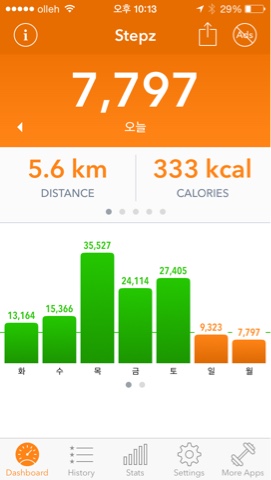
스탭즈 앱으로 체크한 걸음수입니다. 하루 3만5천보를 걸었네요! 

오전에 오사카성 투어 

덴노지에 있는 동물원과 덴덴타운, 센세카이 주변을 투어 

덴포잔의 대관람차 주변 투어 

교토역 근처의 히가시혼간지, 니시혼간지 투어 

나라 공원 투어 

고베 산노미야 역 근처 유럽풍 건물들 투어 

런키퍼 앱으로 체크한 이동 경로들입니다. 중간에 미처 체크를 못한 경로도 있지만 비교적 상세하게 체크를 했습니다. 


위클리 우에혼마치 호텔입니다. 비교적 넓고 시설은 약간 낡았지만 덴덴타운, 난카이 난바역, 닛본바시 역에서 가까운 편입니다. 첫날 난카이 난바역에서 숙소까지 걸어서 25분정도에 이동했습니다. 


패밀리 마트에서 구매했는데 0.8도 정도의 과일 맥주입니다. 신기해서 구매했는데 처음보는 맥주입니다. 개당 120엔에서 140엔 정도 입니다. 


 숙소 맞은편에 있는 규동을 파는 집입니다. 보통 290엔에서 800엔정도면 아침 식사를 할 수 있습니다. 주로 아침을 여기서 해결했습니다.


오사카 공원을 오전에 투어했는데 날씨가 무척 좋아서 재미있게 다녔습니다.


역사 박물관입니다. 


중고로 파는 맥북프로와 맥북에어 입니다. 


구매할려던 스컬프트 마우스인데 국내가 더 쌉니다. 


2015년 4월 27일 월요일

C# TransactionScope에 대한 데모 스크립트 입니다.

먼저 회원 테이블 생성 스크립트 입니다.
Create Table Members
(
id int not null,
name varchar(10) not null,
title varchar(10) not null,
address varchar(50) not null,
iDate datetime not null default (getdate()),
constraint PK_Members_id Primary Key (id)
)
go

Insert Into Members(id, name, title, address) Values(1, '홍길동', '대리', '서울시 강남구 역삼동')
Insert Into Members(id, name, title, address) Values(2, '이순신', '대리', '서울시 강남구 역삼동2')
Insert Into Members(id, name, title, address) Values(3, '장길산', '과장', '서울시 강남구 역삼동3')
Insert Into Members(id, name, title, address) Values(4, '문길래', '부장', '서울시 강남구 역삼동4')
Insert Into Members(id, name, title, address) Values(5, '일지매', '사원', '서울시 강남구 역삼동5')

Select * From Members

--저장프로시져 생성
Create  Proc  up_Members_insert
(
@name varchar(10),
@title varchar(10),
@address varchar(50)
)
As
Declare @id int
Select @id = max(id) From Members
Set @id = @id+1
Insert Into Members (id, name, title, address)
Values (@id, @name, @title, @address)
--실행
up_members_insert 'bb', 'bbb', 'bbbb'

-------------------
TransactionScope데모를 위한 스크립트 입니다.
use test1
go

create table t1
(
id int identity primary key,
name varchar(10) not null
)

use test2
go

create table t2
(
id int identity primary key,
name varchar(10) not null
)


C# 데모 코드입니다. 

  try
            {
                // Create the TransactionScope to execute the commands, guaranteeing
                // that both commands can commit or roll back as a single unit of work.
                using (TransactionScope scope = new TransactionScope())
                {
                    using (SqlConnection connection1 = new SqlConnection(
                        @"server=.\sqlExpress;database=test1;integrated security=true"))
                    {
                        // Opening the connection automatically enlists it in the 
                        // TransactionScope as a lightweight transaction.
                        connection1.Open();

                        // Create the SqlCommand object and execute the first command.
                        SqlCommand command1 = new SqlCommand(
                            "Insert Into t1 (name) Values('AA')", connection1);
                        int returnValue = command1.ExecuteNonQuery();
                        Debug.WriteLine(returnValue); 

                        // If you get here, this means that command1 succeeded. By nesting
                        // the using block for connection2 inside that of connection1, you
                        // conserve server and network resources as connection2 is opened
                        // only when there is a chance that the transaction can commit.   
                        using (SqlConnection connection2 = new SqlConnection(
                            @"server=.\sqlExpress;database=test2;integrated security=true"))
                        {
                            // The transaction is escalated to a full distributed
                            // transaction when connection2 is opened.
                            connection2.Open();

                            // Execute the second command in the second database.
                            returnValue = 0;
                            SqlCommand command2 = new SqlCommand(
                                "Insert Into t2 (name) Values('BB')", connection2);
                            returnValue = command2.ExecuteNonQuery();
                            Debug.WriteLine(returnValue); 
                        }
                    }

                    // The Complete method commits the transaction. If an exception has been thrown,
                    // Complete is not  called and the transaction is rolled back.
                    scope.Complete();

                }

            }
            catch (TransactionAbortedException ex)
            {
                MessageBox.Show(ex.Message); 
            }
            catch (ApplicationException ex)
            {
                MessageBox.Show(ex.Message); 
            }

2015년 3월 5일 목요일

Swift - description()구현에 대한 데모 코드입니다.

기존 오브젝티브씨에서 처리하던 description 메서드와 같은 처리는 아래와 같이 합니다. 
객체 이름을 통해서 문자열을 처리해야 하는 경우 아래와 같이 처리한다. xcode 6.1에서도 버그 때문인지 제대로 처리가 안되서 NSObject를 같이 상속 받고 오버라이드하면 정상적으로 문자열을 리턴한다.

class Person:NSObject, Printable {
    var name = "James"
    var age = 100
   
    override var description: String {
        return name + "(\(age))"
    }
}

var newPerson = Person()
println(newPerson)

var msg = "Profile: \(newPerson)"

println(msg)

html5의

정상적으로 동작하는 경우도 있고, 그렇지 않은 경우도 있어서 검색해 보니 웹서버의 MIME 등록여부에 따라서 문제가 되네요.
아래와 같이 web.config에 파일 확장자를 등록해주면 텍스트가 아닌 비디오 파일로 인식하네요.

<configuration>

    <system.web>
      <compilation debug="false" targetFramework="4.5" />
      <httpRuntime targetFramework="4.5" />
    </system.web>
    <system.webServer>
      <staticContent>
        <mimeMap fileExtension=".mp4" mimeType="video/mp4"/>
        <mimeMap fileExtension=".m4v" mimeType="video/m4v"/>
        <mimeMap fileExtension=".ogg" mimeType="video/ogg"/>
        <mimeMap fileExtension=".ogv" mimeType="video/ogg"/>
        <mimeMap fileExtension=".webm" mimeType="video/webm"/>
      </staticContent>
    </system.webServer>
</configuration>

아이폰 듀오에 대응하는 데모 #2

폴더블·듀얼 화면 iPhone Duo를 대상으로, SwiftUI 수업에서 순서대로 사용할 수 있는 데모 10개를 구성했습니다. 각 데모는 학습 목표 → 코드 → 단계별 설명 → 확인 과제 순서입니다. Apple 공식 안내에 따르면 Duo의 전체 화면...